

How to Share Your Ads Access/Gen Code on Instagram & TikTok
Updated: Jul 14

Quick real talk: Your content is popping off. Let's make sure the right people see it! So a brand loved your content and wants to boost it: more reach, more eyes, maybe some new followers out of it. Good news!
Here's the part that trips people up: to actually run your content as an ad, the brand needs a code from you. Different platforms call it different things "Authorization Code," "Access Code," "Gen Code," "Spark Ads Code" Same idea, different name depending on who's asking.
No fluff, no 10-minute YouTube tutorial. Here's exactly where to find it on Instagram, Facebook, and TikTok.
TikTok: Step-by-Step Guide to Generate Your Spark Ads Code
TikTok's process is called "Spark Ads authorization." Here's how to get your code:

Step 1: Open TikTok App & Select Your Post
Open the TikTok app and click on the post you published for the brand.
*Please ensure you are signed in to the same account used to publish the branded content.

Step 2: Press on the 3 Dots (•••)
Locate the three-dot icon (•••) on the right side of your post and tap it to open the options menu.

Step 3: Tap on "Ad Settings" From the menu that pops up, look for "Ad Settings" and tap on it.

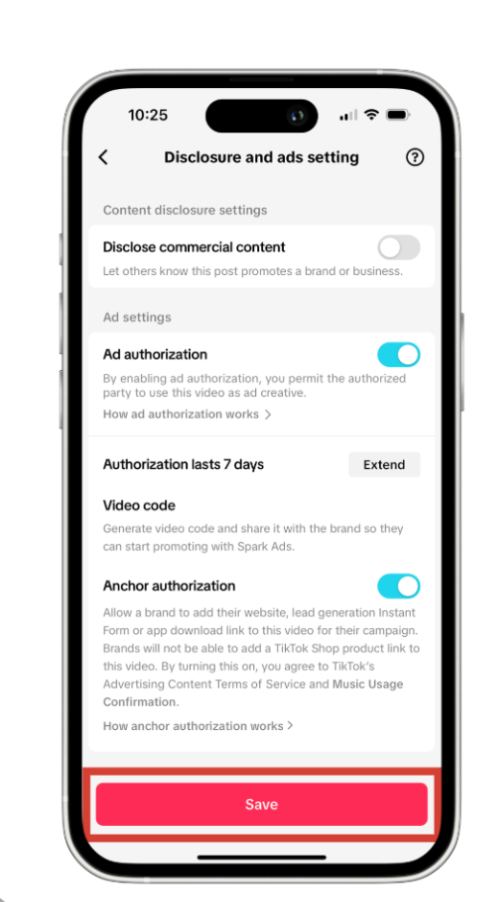
Step 4: Enable "Ad Authorization"
Swipe the toggle to the right to turn on "Ad Authorization". then select the available duration or period that the client wants to use to boost your ads.
Step 5: Save and Refresh Page
Tap “Save” to confirm your settings, then refresh the page to ensure all changes are applied successfully.

Step 6: Press “Manage” on Video Code Sector and then “Copy Code”
Go back to your video settings,
Look for Video Code section,
press "Manage," and then tap "Copy Code" to get your authorization code.
Here’s what the code should look like:
Instagram & Facebook (Meta): Step-by-Step Guide to Get Your Authorization Code
Your branded content is already live on Instagram. Here's how to grab that code:

Step 1: Open Instagram & Facebook App & Select Your Post
Open your Instagram & Facebook account and click on the post that you published for the brand.
*Please ensure you are signed in to the same account used to publish the branded content.

Step 2: Tap the Three Dots Menu (•••) Locate the three-dot icon (•••) on the right side of your post and tap it to open the options menu.

Step 3: Press on "Partnership Labels & Ads"
Scroll down and tap “Partnership Labels & Ads” from the menu.

Step 4: View and Copy Your Code Swipe right on “Get Partnership Ad Code” to enable ad authorization. Once enabled, copy your unique partnership ad code.
Your code should look similar to this: adcode-ABkTBA88qgqihirh_fejiffblsd
Quick Tips
TikTok: Switch to a Business or Creator account and turn on TikTok Pro
Instagram: Set your account to Professional (Creator or Business)
Double-check you've copied the whole code! A missing character, and it won't work
Reply fast so the quicker you send it, the quicker the campaign goes live
🚀 Influencer Marketing & Social Media Management in Thailand & Worldwide
At Next Degree Agency, we handle the unglamorous stuff from ad codes chased down, contracts sorted, budgets tracked, requirements checked off, so you're not the one scrambling before launch.
We're a Bangkok-based Influencer Marketing and Social Media Management agency working with F&B, hospitality, and lifestyle brands across Thailand and Southeast Asia to turn campaigns into measurable results.
Ready to make your next campaign your best one yet? Connect with our team of Social Media Marketing, Influencer Marketing, and Press Relations experts today.
Email: info@nextdegreeagency.com

Comments